
See Workbooks in action
Don't miss out: Claim a free 90-minute CRM Success Workshop now
Don't miss out: Claim a free 90-minute CRM Success Workshop now

Get clear dashboards and analytics

Automated campaigns and customer journeys

Accurately monitor, forecast, and plan your sales

Manage invoices, contracts and order from one tool

Boost productivity and drive your sales process

Manage projects, track revenue and budget
With a New Year comes a new view! We are pleased to announce an update to Workbooks that adds many new features including a Calendar View, for example to view your upcoming Meetings for the week.
Please note that Apple’s Safari browser for Windows is no longer supported as of this release (Apple discontinued it over two years ago). Support for Mac users accessing Workbooks using Safari will continue as normal.
A Calendar View is now available from any grid of data that has a date, or date and time column, including Reports. From the View menu on the right above the grid, select ‘View as Calendar’. To go back to list view, select ‘View as List’.
In a Calendar view, you can choose which date, or date and time column to arrange the records by across the timeline. You can categorise the records by a column (e.g. ‘Assigned to’) to colour them. Calendar views can also be filtered and saved, just like normal list views.
You can choose which day of the week the Calendar view presents as the start of the week in Start > Preferences.
To find out more about the Calendar view, click here.
Meetings now have Attendees so you can record who attended your meetings. You can enter a name or an email address for an Attendee. If the name or email address matches a Person or Sales Lead in Workbooks, then the record is linked to the meeting. If an email address does not currently match a Person or Sales Lead, then it will be linked up when a record is created. Right-clicking on an Attendee, or clicking on the little down-arrow will offer a range of actions and links to the related records.
NOTE: Workbooks does not send meeting invitations. You will still need to do this in your preferred calendaring solution like Outlook or Google Calendar.
We have also extended the meeting records to support additional functionality, including recurrence and attendee status. These have been implemented in this release so we can improve the integration with Outlook and Google Calendar in later releases of Workbooks.
Information on creating Meetings is available in our Knowledge Base here.
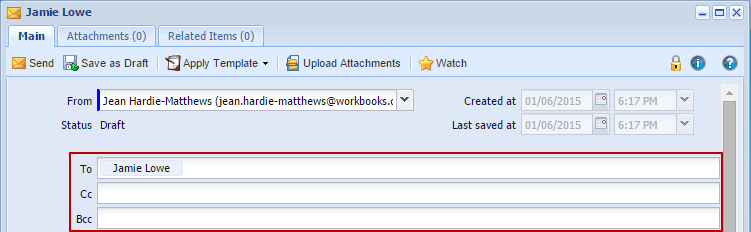
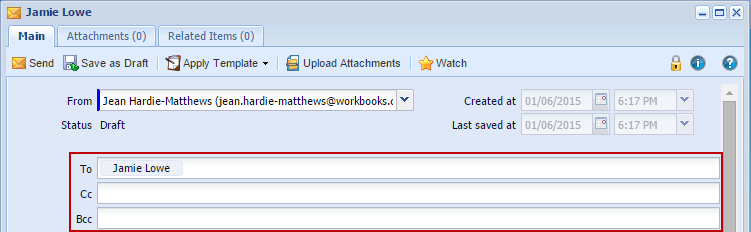
The user interface for Email recipients has been redesigned and significantly improved using the new functionality developed for Meeting Attendees. Now, instead of clicking the ‘Add a recipient’ button, you can simply start typing a name or an email address into the To, Cc or Bcc fields as shown below:
We have added shortcuts to Dashboards and Recent Items to the desktop. You can now customise which of the standard shortcuts appear on the desktop in the Preferences dialog. Click here to learn more about the functionality available in your Preferences.
There are now distinct Capabilities for viewing Reports, and for creating and editing them. You may choose to allow a user to view Reports but not create or edit them, or even remove access to Reporting altogether.
Previously a few of the columns available to select in Reporting were hidden at the bottom of the list under a “More columns…” sub-menu. Following customer feedback we have removed the sub-menu, and the columns within it are now available along with all of the other columns in alphabetical order.
Clicking the Filters button on a grid when there are criteria defined causes the criteria to be hidden, allowing more space to see the results. Now the Filters button also shows the number of criteria so that it is clearer that they are hidden rather than removed.
The Apply Filters button to the right of the filter criteria now has a label to clarify what it does.
IFrame custom field tabs are sometimes used to attach a Web Process to a record, enabling the process to make changes to related records, external services or even the record itself. Previously, changing the record would cause the user’s view of the record to become stale, and they would have to reload it. Now, you can tick the ‘Modifies the record’ checkbox, causing the record to remind the user to save their changes before going to the tab, and vice-versa reloading the form when returning to the Main tab.
There are a number of enhancements to the Workbooks API and automation.
This release introduces Workbooks Plugins: combinations of scripts and configuration that can extend your Workbooks database with additional features and integrations with third-party services. We will be working with other services to make their functionality available in Workbooks via Plugins in the near future.
The API Reference documentation can now be generated automatically from your database, including all of your custom fields and reports, making developing Workbooks clients much easier. Go to Start > Configuration > Automation > API Reference.
The documentation index opens in a new browser window, listing all of the record types that Workbooks exposes in the API plus all of your reports.
For convenience, there is also a link to the API Reference for a specific Report from the Automation tab of the Report View in the Report Editor.
This release introduces a number of new endpoints in the Workbooks API. You can now develop API clients that interact with:
There are now two more new types of Processes, enabling even more interesting enhancements to Workbooks:
Previously you had to copy a Script from the Script Library to be able to use it in your database. This caused problems when maintaining those Scripts: every copy had to be updated. Now you can run a Script directly from the Script Library, so if we modify the code or need to address any issues you’ll benefit from those enhancements immediately. Responsibility for the maintenance of Scripts you’ve copied into your database or created yourselves remains with you.
An API Key allows a client to access Workbooks and perform actions on behalf of a specific user without revealing the user’s password. This release adds capability restrictions, so that you can grant a client access to Workbooks, but only give it a few of the capabilities of the user.
There are over 250 other minor enhancements and bugs fixed across Workbooks in this release, including:









