
See Workbooks in action
Don't miss out: Claim a free 90-minute CRM Success Workshop now
Don't miss out: Claim a free 90-minute CRM Success Workshop now

Get clear dashboards and analytics

Automated campaigns and customer journeys

Accurately monitor, forecast, and plan your sales

Manage invoices, contracts and order from one tool

Boost productivity and drive your sales process

Manage projects, track revenue and budget

 Contract Management is an optional module which can be added to either the CRM Edition or the Business Edition for a small fee. We have been working alongside a number of customers to define the functionality of this module and it has been designed to address the following types of problems:
“We sell support contracts – but the only way we have of tracking the data is in spreadsheets. We need a more effective tool that will enable us to record contract information and track renewals, helping us to understand the value of our contracts.”
“We have customers calling for support whose contracts have expired, however the support team have no visibility of the contract status. This is a double whammy as we are providing free support, ultimately costing us money and we are missing a sales renewal opportunity.”
“We use Workbooks Business to process orders and create invoices, but we record contract data in spreadsheets. This means we have to re-key data and manage two different systems. We would like it all in one place.”
“We would like to understand the profitability of our contracts, so we want to track the amount of cases raised against a specific contract.”
So with these types of problems in mind we are adding the following functionality:
The contract management module will allow you to record all this information in a new record type called a ‘Contract’.
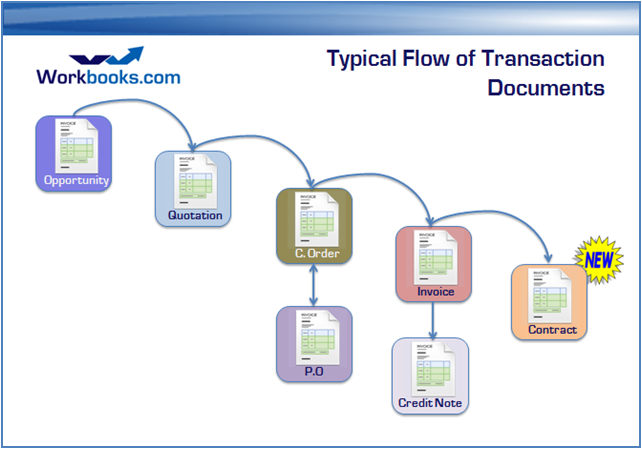
A contract record is in fact a new type of Transaction Document (like invoices and orders) and as with all other Transaction Documents, you can run all the same types of reports and analysis. Key features of a contract record are:
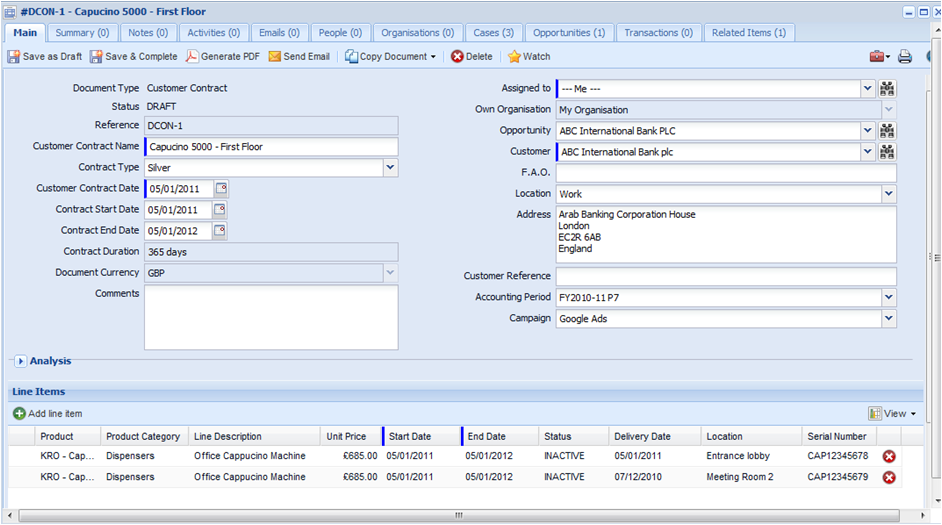
By using the contracts module, customers will be able to store all the customer contract information in one place, alongside their CRM and business transaction data. Because contract records are just like every other record in Workbooks, you will be able to create reports to measure and manage your contracts, for instance:
If you are a Workbooks Business customer you will be able to create contracts from other transaction documents such as orders. When you create a contract from another transaction document, Workbooks copies across all line items which have a ‘Contract start and end date’ set. Start and End dates are new fields which have been added into the line item grid, to identify line items which are contracts. By using this approach, you can have an order which contains a mix of contract line items and standard line items. So if you have an order for a projector, which contains a line item for the projector itself and a second line item for the 12 month support contract, when you create a contract Workbooks will only carry forward the support contract line item.
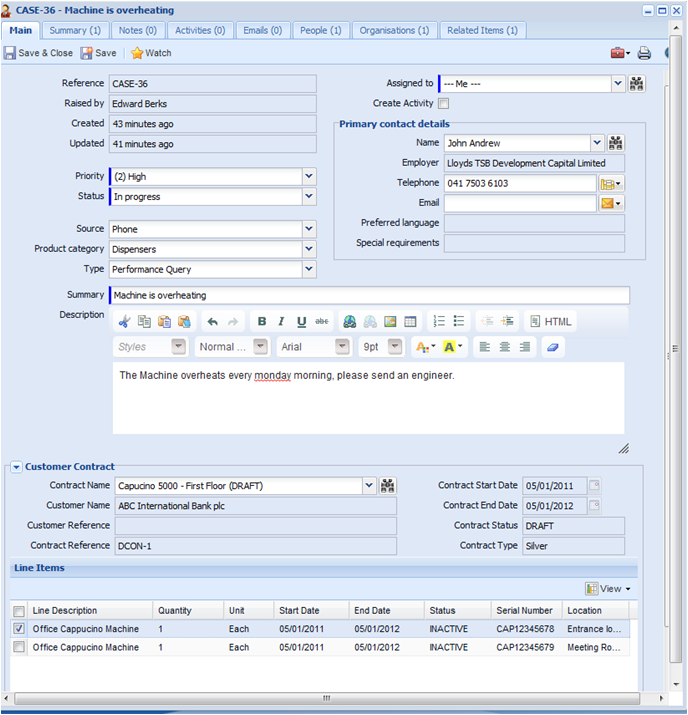
The contract management module is integrated with cases. This means you can track cases against a specific contract and even specific contract line items. If one of your customers calls up with a problem on a specific product, you can easily search by serial number or product key to find the relevant support contract. At this point, you can check if the support contract is still valid and if they are entitled to the level of support they are requesting.
We will be releasing contract management at the end of January and we will be scheduling demos of the new functionality over the next few weeks for existing customers.
We hope you like it!









