









Custom Filters
Custom Filters can be applied to Landing Pages and Report Views, allowing you to use Boolean operators to create complex filters that go above matching all or any of the filters set.
NOTE: Custom Filters can be added to any grid view where a filter is applicable e.g. Tabs, Line Items
To create a Custom Filter you will first need to add Filters to at least two Columns that you want to use within the Landing Page or Report.
From the dropdown menu under Match all you will now able to select a new value, Custom.
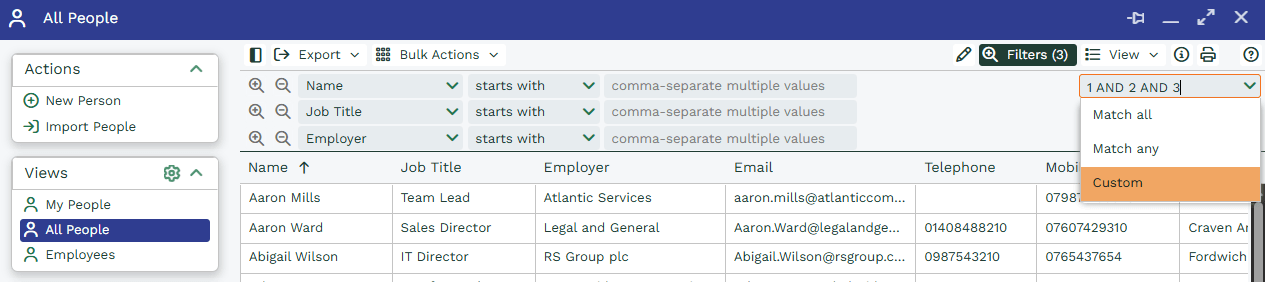
Selecting Custom will apply a Match All filter such as 1 AND 2 AND 3 to the Picklist. This Field will then become editable so that you can type directly into the Filter and amend it as needed.
Boolean Operators Reference
When using Custom Filters, you can use the following Boolean operators to create more complex filter logic:
| Operator | Name | How it works in Custom Filters |
| AND | Logical AND | Returns records that match all of the conditions. Example: 1 AND 2 > must satisfy both filter 1 and filter 2. |
| OR | Logical OR | Returns records that match any of the conditions. Example: 1 OR 2 > matches filter 1 or filter 2. |
| NOT | Logical NOT | Excludes records that match a condition. Example: NOT 3 > removes any records matching filter 3. |
| XOR | Exclusive OR | Returns records where only one condition is true, but not both. Example: 1 XOR 2 > matches records that satisfy filter 1 or filter 2, but not both. |
| ( ) | Brackets | Groups conditions to control the order they are evaluated. Example: (1 AND 2) OR 3. |
For example, if you want to show People Records that are assigned to Users called Jane AND the People who are in London OR The People that are assigned to Users called Jane AND the People within an Industry starting with IT you could apply the below.

You will need to remember to use brackets where appropriate for example:
1 AND 2 OR 3 would be read as “(1 AND 2) OR 3” which in this scenario would return results that are Assigned to Jane AND in London OR any Record with an industry starting with IT.