









Using Sales Tax Rulesets
If you regularly sell the same product to a customer, you can speed up transaction document creation by setting up rulesets on the product.
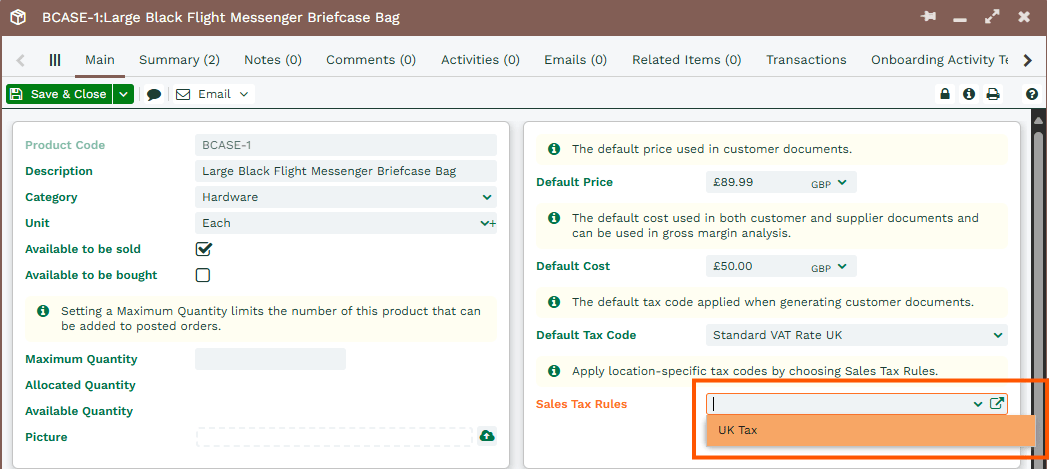
Use the ‘Sales Tax Rules’ picklist on the product to select from all available sales tax rulesets across your tax regimes.
Note
If you're unsure you've selected the correct ruleset, use the open URL button to the right side of the field, to open the record and check the details straight away.
Once you’ve set a ruleset on the Product, you can control which tax codes are available on line items. These are based on:
- The customer country
- and/or the delivery country set on the line item
For example, you might create a ruleset where the customer country is United Kingdom, but the delivery country is France or United Kingdom. The relevant tax codes will be available when those conditions are met.
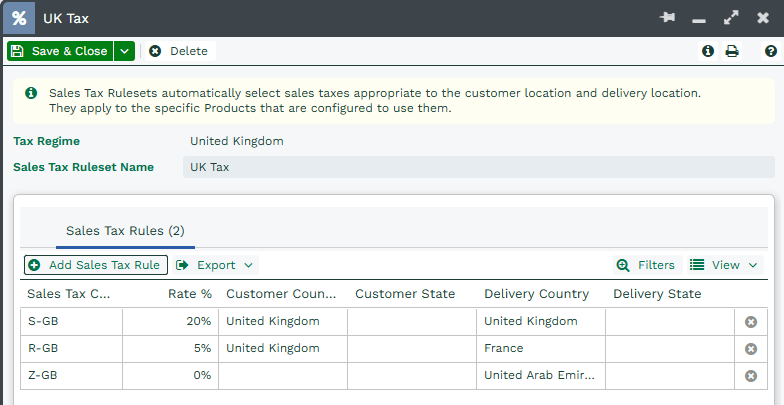
If you create a line item using a Product with this ruleset, and the customer country is United Kingdom but no delivery country is set, no tax codes will be available.
To resolve this, make sure the delivery country is set so the correct tax codes can be applied.

Note
There’s no way to automatically populate the delivery country on the line item from the customer’s delivery address. You'll need to manually select the delivery country on each line item and then choose the appropriate tax code based on the available options.
However, when changing the delivery country to France or United Kingdom, the relevant tax code becomes available.

These rulesets help make sure the correct tax rates are applied based on the information entered, reducing the risk of errors.