Managing Records with the Mail Sync Add-in
The Mail Sync Add-in not only allows you to create and manage contacts directly from Outlook, but it also supports interaction with several other record types. From within the Add-in, you can log new tasks for contacts, review their existing cases, access employer details, link the contact to relevant record types and much more.
Searching for Records
The Mail Sync Add-in allows you to search through a number of record types, these are:
- People
- Tasks
- Meetings
- Emails
- Organisations
- Transaction documents (i.e., Opportunities, Invoices)
- Cases
You can search for records using the search bar at the top of the Add-in. The Add-in looks up records based on the Name, Summary, or Description fields and displays the results from all record types in a single list within the Add-in.

If you want to search for a record from a specific type, this can be done by using the funnel button, which will open a picklist allowing you to choose from a list of all of the available record types.

If you want to then clear the search results and return to the Contact Cards of the email you are viewing pressing the refresh button will remove all of the search results and return you to the default view.

Viewing Employer Details
When viewing a Contact Card in the Mail Sync Add-in, you can also see details about the person’s employer. To access this information, simply click the employer’s name on the Contact Card.

This will open an Organisation Form that shows a summary of the information that is held within Workbooks. From this form not only are you able to review information such as the contact details, but you can also make amendments within Outlook that will update the Organisation Record directly in Workbooks.

At the bottom of the form you are also able to review all of the related Tasks and Cases linked to the Organisation in Workbooks. From the Employer form you will also have the ability to create a new Person Record within Workbooks that will be linked to the Organisation as an Employee. To do this you will need to open the More… menu, here you can either open the Organisation Record and view it fully in Workbooks or select New Person to create a new employee, this options is available if they aren’t already created in Workbooks.

Selecting New Person will open a create person form, where the Employer will be automatically set to the Organisation that this was generated from. In addition to this Field you will also need to ensure that the Person name, Email and Assigned to fields are populated.

Viewing Related Items
When viewing a Contact Card you will be able to see all of the related Tasks, Meetings and Cases that are linked to that person. If these Records exist then you will see the menus at the bottom of their Contact Card with a count of the number of records.
Note
The Mail Sync Add-in limits the number of records shown to 100 of each type.
In order to review these records you will need to expand the menu, this will allow you to see a summary of the records listed against that Person.

To open a record in Workbooks select the ellipsis (…), this will open a new menu and give you the ability to open the record directly in Workbooks.

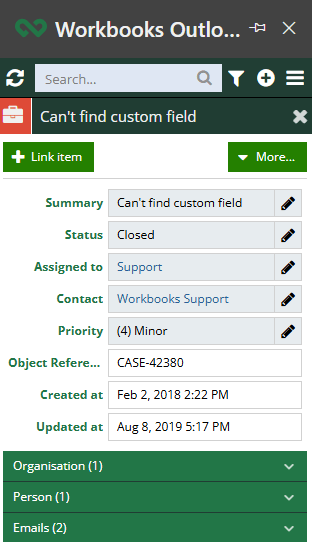
It is also possible to review details of the Record within Outlook, by selecting the Summary this will open the details of the Case that are accessible to the Add-in. All Record types can be updated and edited from within the Mail Sync Add-in providing that there is a pencil icon next to the Field.