









Knowledgebase articles
- Welcome to the Knowledge Base
- Training
- Welcome to Workbooks Support: Your Go-To Guide
- Workbooks Customer Hub
- Getting Started
- Preferences
- Activities
- Cases
- Email
- Importing Data
- Leads
- Marketing
- Introduction to Marketing
- Mailshots
- Templates
- Event Management
- Compliance Records
- Spotler Integration
- What is Spotler?
- Navigating your Spotler homepage
- Introduction to GatorMail
- GatorMail Configuration
- GatorMail Hard Bounces
- Advanced Features
- Sending Emails in GatorMail
- GatorCreator
- Setting up the Plugin
- Viewing Web Insights Data on your Form Layouts
- Domain Names and Online Activities
- Reporting incorrect Leads created through Web Insights
- Reporting on Web Insights data
- Using UTM Values
- Why aren’t Online Activities being created in the database?
- Why is GatorLeads recording online activities in a foreign language?
- GatorSurvey
- GatorPopup
- Dotdigital
- Integrations
- SFTP/FTP Processes
- Docusign Integration
- DocuSign Functionality
- Adobe Sign Integration
- Zapier
- Introduction to Zapier
- Available Triggers and Actions
- Linking your Workbooks Account to Zapier
- Posted Invoices to Xero Invoices
- Xero payments to Workbooks Tasks
- New Case to Google Drive folder
- New Case to Basecamp Project
- New Workbooks Case to JIRA Ticket
- Jira Issue to new Case
- 123FormBuilder Form Entry to Case
- Eventbrite Attendee to Sales Lead and Task
- Facebook Ad Leads to Sales Leads
- Wufoo Form Entry to Sales Lead
- Posted Credit Note to Task
- Survey Monkey responses to Tasks
- Multistep Zaps
- Email Integrations
- Microsoft Office
- Auditing
- Comments
- Using Postcode Lookup
- Data Enrichment
- Reporting
- Using Reports
- Advanced Reporting
- Reporting FAQs
- Transaction Documents
- Displaying & Adding Transaction Documents
- Copying Transaction Documents
- Transaction Documents Fields Help
- Transaction Documents Line Items Help
- Printing & Sending Transaction Documents
- Managing Transaction Document Currencies
- Managing Transaction Document Statuses
- Setting a Blank Default Currency on Transaction Documents
- Credit Notes
- Customer Orders
- Invoices
- Quotations
- Supplier Orders
- Sagelink
- Configuration
- Releases & Roadmap
- Workbooks Glossary
Authenticating your Mail Sync Profile
Last updated : 29th July 2026
Sometimes, the Mail Sync may require a User to authenticate their Email client credentials. If this is the case, a system admin will see the following error on the Mail Sync Configuration database:
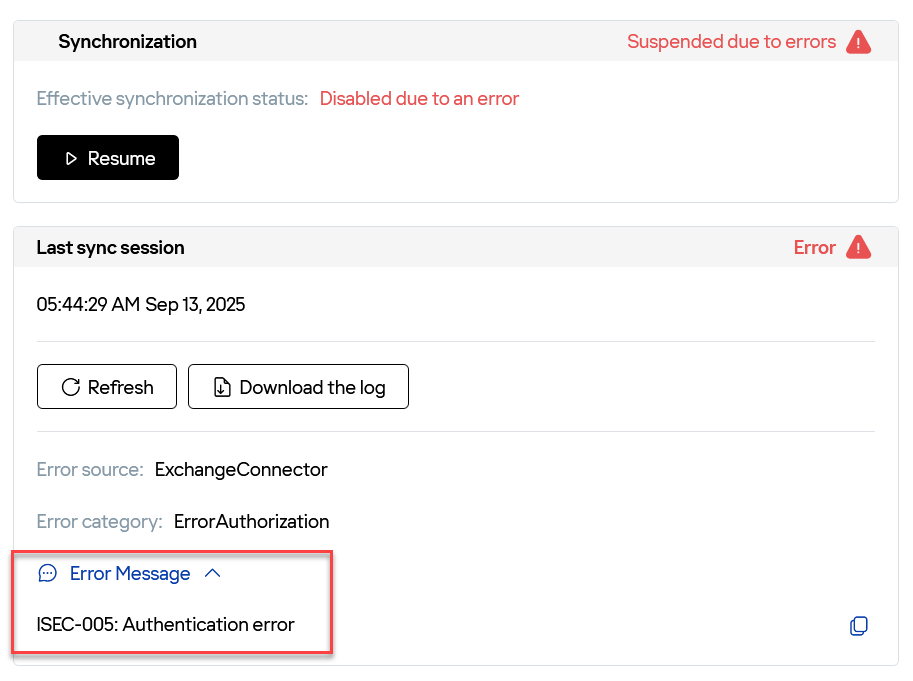
To resolve this, the User will need to follow these steps:
1. Click on your initial or profile photo

2. Click “Preferences”

3. Click “Integration”

4. Click “Mail Sync”
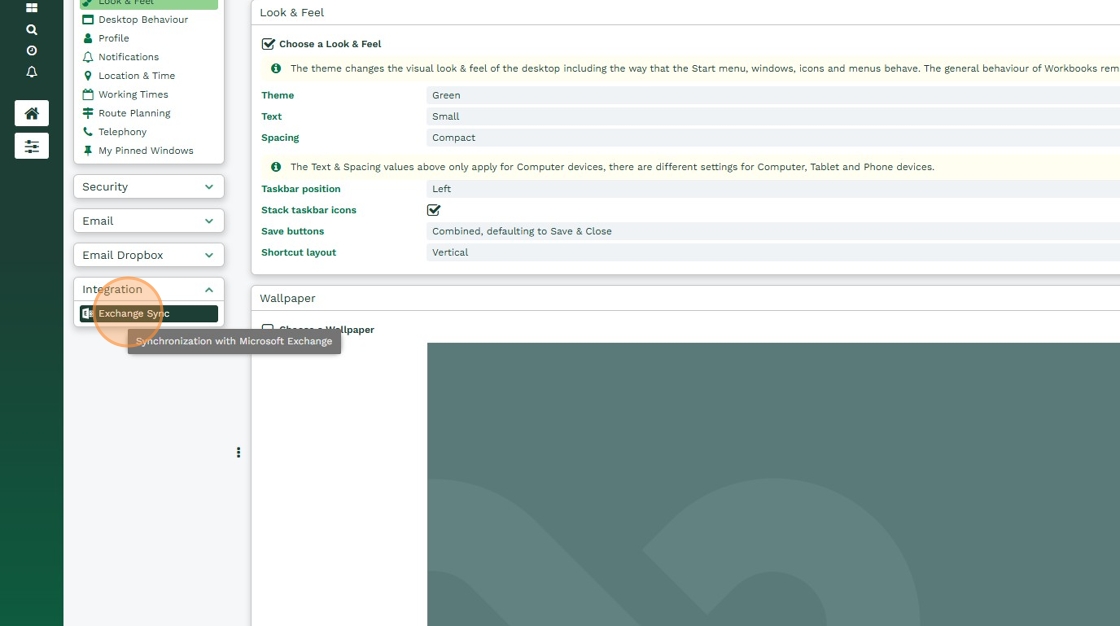
5. Click “Refresh”

6. Enter your email credentials

7. Click “Connect”

Note
If you click 'Refresh' and the new window asking for your email credentials doesn't open, please ensure the pop-up blocker is disabled in your browser and try repeating these steps again.
Was this content useful?