









AI Reporting
Reporting on Workbooks AI allows you to track and understand how AI is being used across your organization, helping you make informed decisions about adoption, performance, and value. You can create AI Usage Reports directly within Workbooks by navigating to: Start > New > Report > Create Blank Report > AI User Usage Hourly
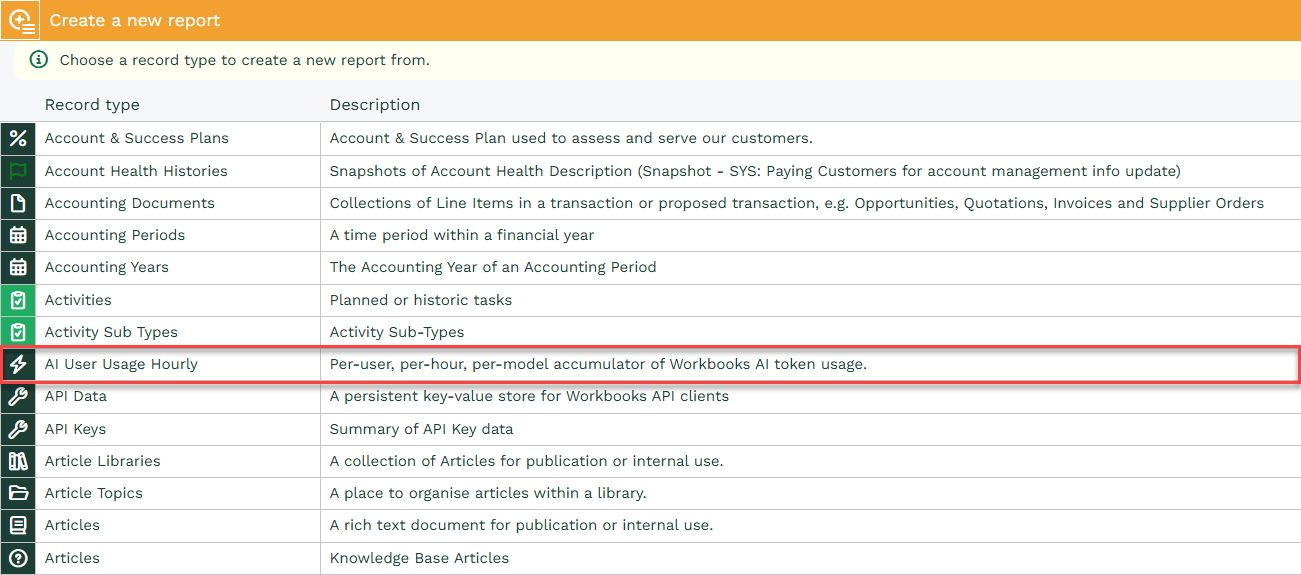
AI usage is recorded by hour to give you a clear view of when AI is being used across your CRM database and helps you see usage patterns in more detail. Because AI usage is recorded by hour, you can roll this information up into broader reporting periods such as daily, weekly or monthly totals.
For example:
- Daily reporting can help you monitor short-term usage and identify changes from one day to the next
- Weekly reporting can help you compare usage across working weeks and review trends over time
- Monthly reporting can help you measure overall adoption, track growth, and support higher-level analysis
Why Report on AI usage?
Reporting on AI activity can support a range of practical use cases, including:
Monitoring adoption and engagement – Understand whether your teams are actively using AI features, and identify trends in usage over time.
Identifying training or enablement opportunities – If certain teams or time periods show lower usage, this can highlight where additional guidance or promotion may be beneficial.
AI Agent usage and cost – Understanding which Agents are being used the most is important because you can see where AI is being leveraged most heavily across your database.
Tracking AI usage enables more data-driven decision making, allowing you to make informed choices about where to invest time and resources when rolling out AI features. It also supports improved user adoption, as identifying gaps in usage helps you take targeted steps to encourage engagement and maximize the value of AI. In addition, it provides greater operational visibility, giving you confidence that AI tools are being used effectively and offering insight into how they contribute to day-to-day workflows.
Key Columns
Below is a breakdown of key columns included in an AI report, helping you understand what each field represents and how it can be used to interpret AI usage data effectively:
| Name | Description |
|---|---|
| Agent > Name | AI agent name |
| Call Count | Number of times the agent has been run |
| Hour of use | The date and hour the agent was run |
| Created by name | Name of the User that ran the agent |
| Model | AI model that was used for the request |
| Input tokens | Represent the content sent to the AI, such as prompts, instructions, or any supporting context provided by the user |
| Reasoning tokens | Refer to the internal “thinking” steps the AI takes to process a request and work through a response |
| Total tokens | The combined count of all tokens involved in a request |
Template Reports
Coming Soon…