









Workbooks AI Overview
Overview page gives you a simple introduction to Workbooks AI and how it’s being used across your database. It helps you stay in control by showing what’s happening, who’s using AI, and where it’s adding value.
Overview is broken down over the five following timeframes:
- Last 24 hours
- Last 7 days
- Last 31 days
- This month
- Last month
Each timeframe breaks the data down further and displays it in an easy-to-read bar chart and a key below the chart showing the top 10 Users as well as ‘Other’ for Users outside the top 10.
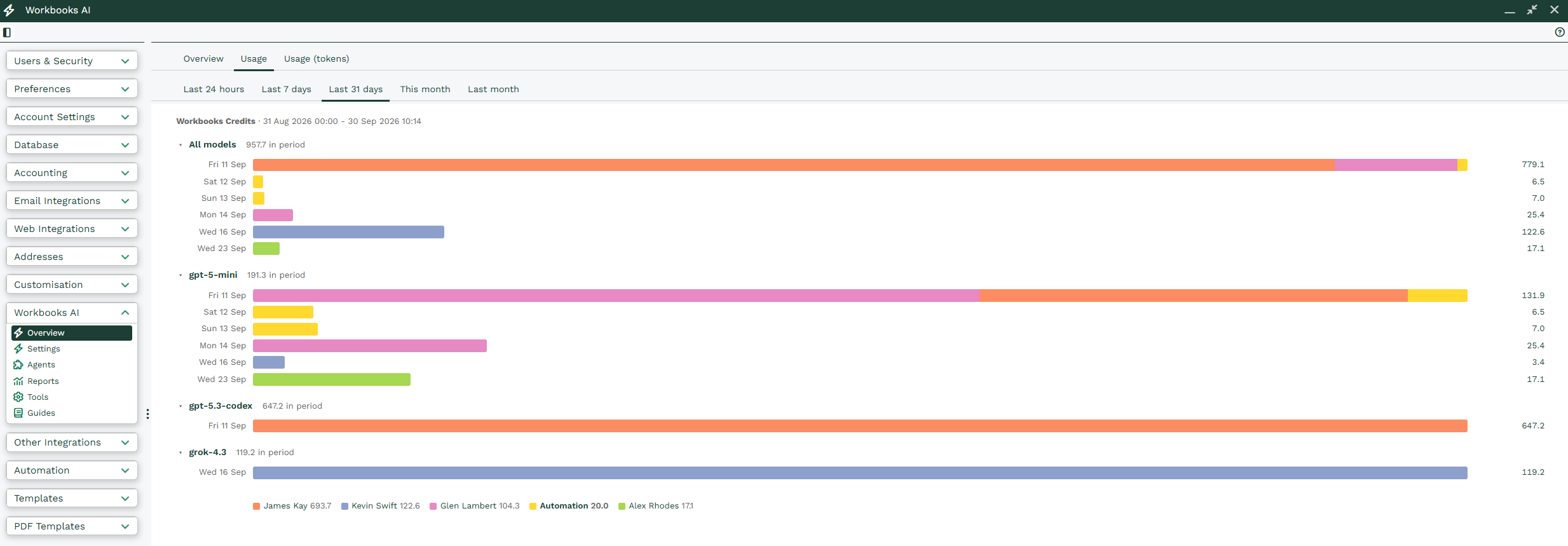
This is beneficial because at a high level, you can see:
- Who’s actively using AI day to day
- Which teams across the business are adopting AI and getting the most value
- Which AI Agents are being utilized and delivering the biggest impact
This helps to quickly see where AI is being leveraged within the business. You can spot areas that are working well, as well as teams or processes that might benefit from extra support, training, or improvement.
For more detailed analysis, you can build AI Reports within Workbooks. For more information on this, please see AI Reports.
Credits
Workbooks AI uses credits. Each User receives a monthly credit allowance, and every AI request uses some of those credits.
The number of credits used depends on what AI is asked to do. A simple question about a single record uses very few credits. More complex tasks, such as reviewing multiple guides, running reports, or creating detailed documents, use more.
Two things can increase credit usage more than you might expect:
- Loading guides into every conversation, even when they aren’t needed
- Keeping long conversations going, as the full conversation is reviewed each time you send a new message
To make the most of your credits, here are some tips for reducing credit usage while still getting the results you need:
- Keep guides that load automatically into every conversation short and focused
- Add specialist guides only to the specific Agents that need them
- Start a new conversation when you switch to a different topic
- Set sensible output limits on Agents that generate long documents