









July 2026 Release
Release date: 11th July 2026
Workbooks AI BETA
Look out over the next couple of months as we will be making our AI available to everyone.
Until then, those customers on the Beta program have been helping us to find and make improvements to the functionality, which will be included when this goes on general release.
In the meantime, AI Beta customers will benefit from the following:
- You’ll see a new button to open AI quickly on a record. It will open it in the Side Panel for you if your Layout has one, or drop down a window from the top of the form.
- Agents can now be invoked via the API, which means we can now automate them to run in the background. Talk to your professional services team about what they could implement for you.

Keyboard Shortcuts
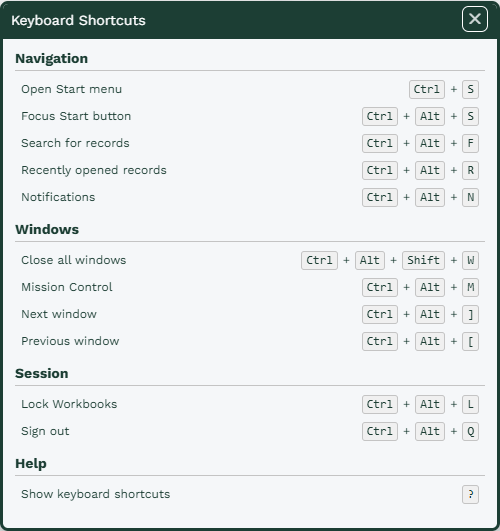
For those of you who love navigating using Keyboard Shortcuts, we’ve added some in! You can find these shortcuts using the ? key (as long as your current focus isn’t a text entry field).
Version Control
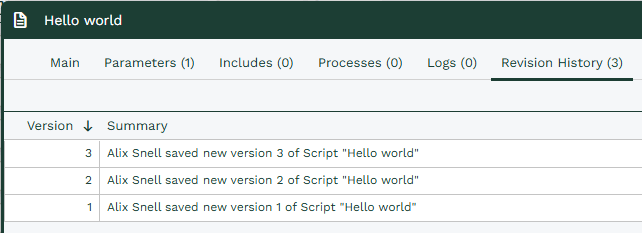
To make it easier to track and manage changes made in your database, we’ve added version control in a couple of places. As of this release, any changes made to Scripts or AI Agents will be tracked in the Revision History tab. You’ll be able to see the difference between the current and previous versions, and revert back to a previous version.
Database Creation
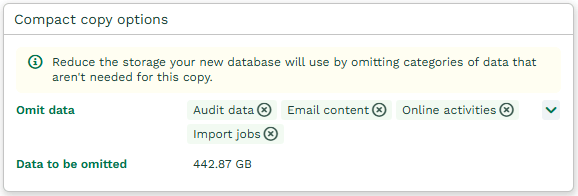
To help you reduce storage usage when you take copies of your database, you now have the option to omit some record types from the copy. The record types you can exclude are Audit, Emails, Online Activities and Imports.
Clean Theme is going soon
As we mentioned last release, we are planning to deprecate the Clean Theme soon. Next release, we will be moving everyone over to the Green Theme, so now is a good time to turn it on and get familiar with it. You can find your Theme in Preferences under ‘Look & Feel’.
Other Changes
If you use the ‘Source’ mode to edit HTML in rich text fields, or you work with scripts, you’ll now see a new editor that displays the code in a more readable format.