









Database Settings
What databases settings you can apply, and what each of them do, including how discount is applied to line items, how Sales Leads are converted, if the primary contact is displayed on meetings etc.
Within Database Settings (navigate to Start > Configuration> Database > Database Settings) you can control;
- the user interface for managing Own Organisation Relationships.
- whether or not to require a Customer Agreement before creating a Transaction Document.
- the behaviour of the Copy Documents function.
- what to do when a Transaction Document is Posted.
- the way in which Supplier Orders can be raised in Workbooks.
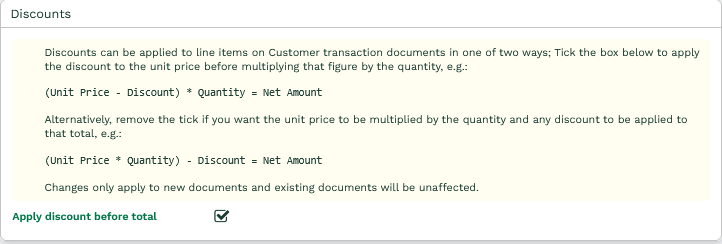
- how discount is applied to customer transaction line items.
- whether Primary Contact details are shown on a Meeting and whether the attendee status is tracked.
- if a new Person/Organisation is created when converting a Sales Lead & whether to maintain the Assigned To value.
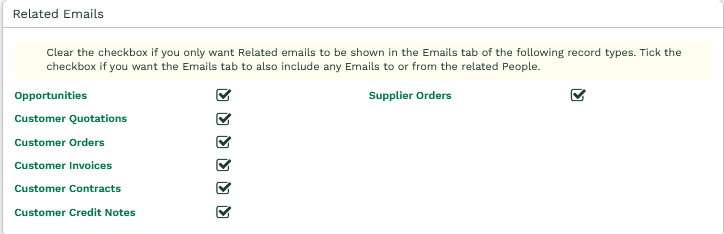
- which emails should be related to Transaction Documents.
- the marketing preferences shown from Mailshots/Mailing Lists
- whether you want GDPR mode turned on.
- whether to automatically relate Google and Bing Online Activities to Campaigns.
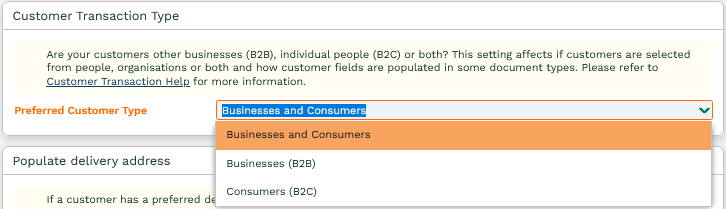
- whether you are B2B or B2C.
- whether to automatically populate delivery address on Transaction Documents.
Own Organisation Relationships
Relationships between People, Organisations and your Own Organisation on the Main tab of a record can be managed using different user interfaces. You can switch between Grid view and Checkbox view:
- Grid in the main tab(prompt for details when creating new relationships)
- Grid in the main tab(create new relationships without prompting)
- In a separate Organisations tab
- Checkboxes in the main tab
Customer Checks
By default, you will only be able to create an Order, Invoice, Credit Note or Contract against a party record if a Customer Agreement exists (created by checking the ‘Customer’ checkbox on People or Organisation records).
You can enable specific Transaction Documents to be created regardless of whether this Customer Agreement exists by clearing the box against the relevant Transaction Document type.
Delete Posted Transaction Documents
You can select this box to turn on the ability to delete Posted Transaction Documents (Quotes, Invoices and Contracts etc.). Any Users that need to be able to do this will also need to be given the Capability Delete Posted Documents, this Capability has been automatically assigned to the System Admin group.
Note: A System Administrator can also grant this Capability to any other User Groups, but we advise against this as Posted documents should only be deleted when absolutely necessary. You should contact Workbooks Support if you are unsure prior to using this feature, particularly if you synchronise your transaction documents with a third party system e.g. Sage. Deleting transaction documents in Workbooks which have already been synchronised to a third party system will mean that your two systems will not reconcile. You should NOT delete posted transactions which have been sent to a customer and form part of your legal accounting history e.g. Invoices or Credit Notes.
Strict Supplier Orders
If Strict Supplier Orders is turned on, when raising a new Supplier Order you will be asked to specify which Supplier the Order is for. You will then only be able to select Products that have a Supply Scheme with that Supplier.
If you are copying another Transaction Document to create the Supplier Order, only the Line Items that have specified a Supply Scheme with the selected Supplier will be copied across. If a Line Item does not have a Supply Scheme selected, then it will be copied across only if the Product has an available Supply Scheme with that Supplier.
If you want to relax this setting you should remove the tick from the checkbox next to Strict Supplier Orders. Removing this tick means it is possible to raise Supplier Orders with any combination of Suppliers and Products.
Discounting Line Items
By default, when you apply a discount to a line item in a customer transaction record, the discount is applied to the unit price and this reduced price is multiplied by the quantity to generate the line item net amount. For example:
(Unit Price minus Percentage Discount) multiplied by Quantity
e.g., £3.85 – 50% = £1.93 * 15.4 = £29.72
To deal with changes in monetary values caused by decimal rounding issues, you might want discount to be applied after the unit price has been multiplied by the quantity. For example:
(Unit Price multiplied by Quantity) minus Percentage Discount
e.g., £3.85 * 15.4 = £59.29 – 50% = £29.65
To apply the discount after the unit price has been multiplied by the quantity, make sure you remove the tick from the checkbox next to Apply discount before total.
Meetings
You can choose whether to display the primary contact’s name, employer and contact details on a Meeting record.
If you are using a Workbooks integrated calendaring service, a tracking tab can be enabled to allow the status of attendees to be tracked.
Sales Lead
When converting Sales Leads, Workbooks will automatically create a new Person and Organisation record for you. If you don’t want the checkboxes for this to be automatically ticked each time you convert a Sales Lead, clear the appropriate checkbox in the Sales Lead section of Other Settings.
You can check the box to maintain the Assigned To value from the Sales lead being converted rather than setting it to whoever converted the Sales.
Related Emails
When viewing emails on the Emails tab of a Transaction Document, you can choose whether to only show those emails that have been related to the document, or whether to include any emails to or from People that are related to the Transaction Document.
Mailshots
You can choose whether you want mailing list membership preferences from a mailshot to be shown or marketing campaign membership preferences.
General Data Protection Regulation (GDPR) Mode
Email communication with non-GDPR compliant personal data will be restricted.
Assign common Online Activities to Marketing Campaigns
Online Activities for Web Page Views that have a Source of Google or Bing can be automatically associated to Campaigns. For more information see our page on Online Activities.
Customer Transaction Type (B2B & B2C)
Out of the box, Workbooks allows you to operate using both B2B and B2C, meaning the ‘Customer’ field on Transaction Documents allows you to select People and Organisations, but this setting allows you to switch between them.
Picking ‘Business’ (B2B) means that the ‘Customer’ field on Transaction Documents (or ‘Prospective Customer’ on Opportunities) will only display a list of your Organisations. It also means that if you generate a Transaction Document from a Person record, it will set the Customer to be the Employer of the Person, and set the Person as the Primary Contact.
Picking ‘Consumer’ (B2C) means that the ‘Customer’ field will only display a list of your People.
Picking ‘Business and Consumers’ will leave the Customer field showing all People and Organisations.
Regardless of which mode you pick, you can still create Transaction Documents for the other Party Type. If you are in B2B mode and create a Transaction from a Person record that doesn’t have an Employer, it will set the Customer to the Person. In B2C mode, you can still generate Transactions from an Organisation record. Using the Search icon next to the Customer field, you can use the ‘All Party Types’ checkbox to change the search results to People and Organisations should you require a different customer type.
Populate delivery address
If you display the Delivery Address fields on your Transaction Documents, you can choose for them to be populated automatically when a Customer is selected. The Delivery Address will then be populated with the customer’s Default Delivery Location if there is one, or their default Billing Address otherwise. See our page on Transaction Documents for more details.