









Start Menu
The Start Menu provides access to records accross Workbooks. It can be used to quickly navigate to different parts of the system, access commonly used features, and open new records.
Using the Start Menu
The Start Menu is available from the toolbar by clicking on the Workbooks logo:

You can use the Start Menu to:
- Navigate to different areas of Workbooks.
- Access standard menu items.
- Create new records using the New menu.
- Access Custom Records and other configured functionality.
The options displayed are automatically filtered according to your user permissions, so you will only see functionality that you are able to access.
Customizing the Start Menu
There is a default layout of the Start Menu, however, this can be modified. The video below provides an overview of customizing the menu.
Administrators can customize the Start Menu to make frequently used functionality easier to access. This can be useful when you want to give users quicker access to specific menu items or Web Processes without requiring them to navigate through the standard Workbooks menus.
Custom menu entries can be added to the appropriate position within the Start Menu and can be configured to suit your organization’s requirements.
To customize the Start Menu, open Start > Configuration > Customization > Start Menu.
From here you will be met with a visualization of what your current Start Menu looks like:
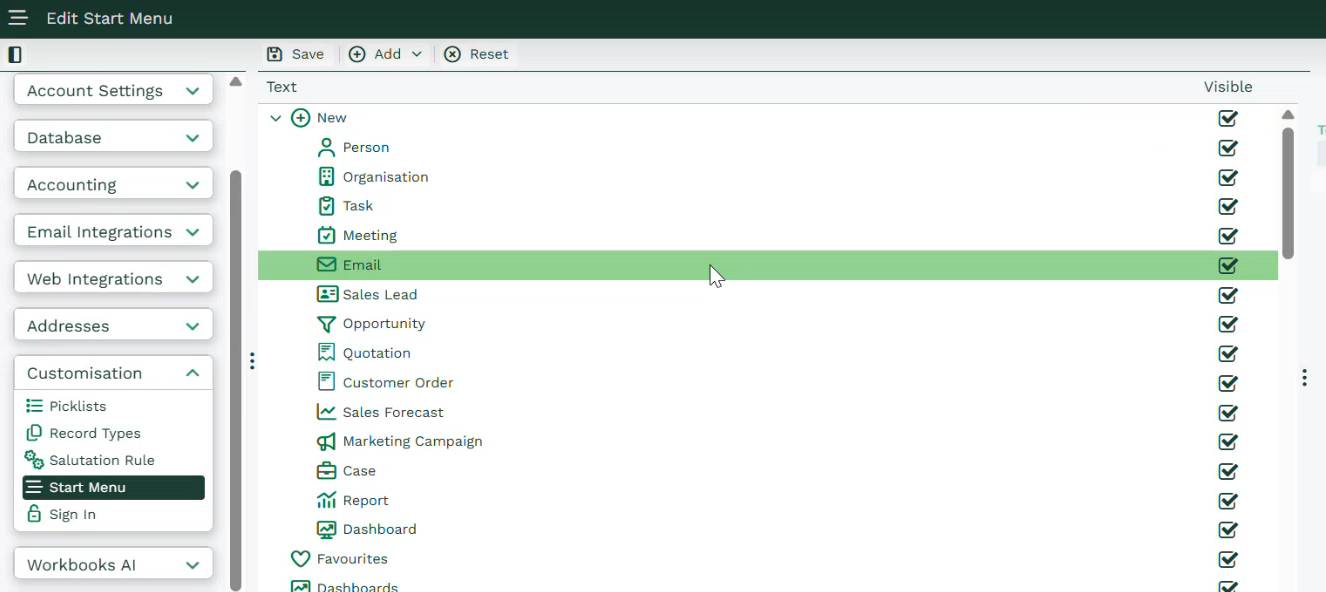
This has drag and drop behaviour to allow you to reorder items within the Start Menu.
Upon clicking on an item within this list, you’re offered customisation on the right which allows you to rename folders and select icons:

You are not able to modify the name of records, this will need to be done within Start > Configuration > Customization > Record Types.
Adding Menu Items
The Add button in the toolbar can be used to add additional items to the Start Menu. This can include copies of existing items, so they can be added to multiple folders.
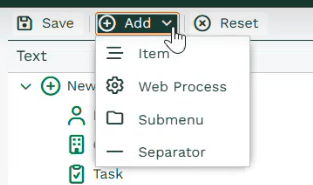
When adding an item, the available options depend on the position you have selected. This ensures that only appropriate types of items can be added to each part of the Start Menu. Before clicking “Add” please ensure you have selected an appropriate location to add the item beforehand by clicking within the menu structure below.
You are able to add:
- Existing standard Menu Items.
- Custom Records.
- Web Processes.
- Submenu folders for organization
- Separators to structure the Start Menu
When you select an item to add, the Window Options panel will display the relevant options for configuring it.
Adding items within the “New” folder at the top will allow for this record type to be created when navigating to Start > New.
Adding Web Processes
Web Processes can be added to the Start Menu so that users can access them directly from the menu.
When adding a Web Process, you can select the process you want to use and configure the text and icon that will be displayed in the Start Menu. These settings can also be edited later from the context panel.
Administrators can select any Web Process when configuring the Start Menu, including Web Processes that are currently disabled. Disabled Web Processes will not be displayed to users.
If a Web Process is subsequently enabled, it will automatically become available in the Start Menu again, provided the user has permission to access it. This means that you do not need to remove and re-add the menu item when the status of a Web Process changes.
Permissions and Availability
Start Menu items are filtered according to the permissions of the user viewing the menu. Adding an item to the Start Menu does not give users additional access to functionality that they would not otherwise be permitted to use.
For Web Processes, Workbooks checks both the user’s permissions and whether the Web Process is enabled. A Web Process will only be displayed when the user has permission to access it and the process is enabled.
This means that administrators can configure the Start Menu once and allow Workbooks to automatically manage which options are visible to each user.
Menu Position
The position selected when customizing the Start Menu determines which options are available to add. This helps keep the Start Menu organized and ensures that functionality is added to an appropriate location.
For example, Custom Records can be added to the New submenu, while standard Menu Items, Custom Records, and Web Processes can be added to other Start Menu positions.
The available options are also filtered according to the current user’s permissions, ensuring that users only see menu entries for functionality they can access.