









Common Email Errors
If you prefer to use an SMTP server to send emails from Workbooks, an email account has to be configured in Workbooks containing your SMTP server details, such as name and port. The Workbooks server connects to your SMTP server using the provided server name and port specified. If the SMTP server accepts the message from Workbooks, it will then send an email out.
If emails fail to send from Workbooks, there could be several possible causes:
- Your SMTP server may not be configured to accept messages from Workbooks servers.
- The authentication type used might not be recognized.
- The Workbooks server may be unable to locate your SMTP server using the provided server name.
- Email credentials within your Workbooks email account may be incorrect.
When the SMTP server rejects a message from Workbooks, it typically returns a specific SMTP error code, which can help identify the issue.
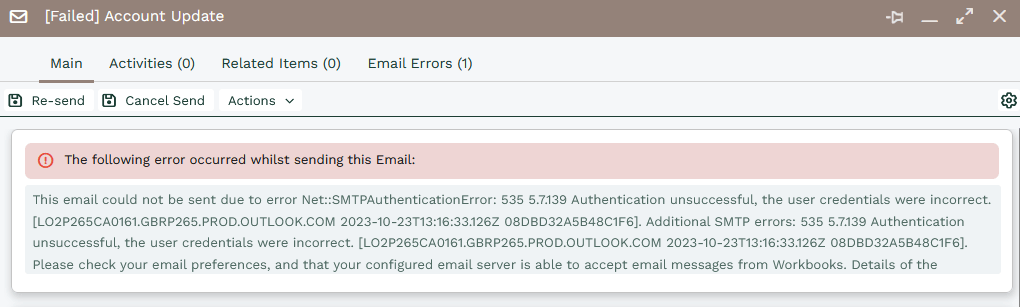
Unfortunately, different servers sometimes use these codes in a different way, making it difficult to identify the exact reason why emails are failing to send.
NOTE: After entering a password within the Authentication area of Email Accounts and clicking Save, the password will appear blank. Therefore, every time a change is made to these settings you will need to re-enter the password before saving the change, otherwise, the password field will be saved without any value.
Automatic Retry Sending Failed Emails
If an email can’t be sent on the first attempt, Workbooks will automatically retry sending it for you up to 9 times after the initial attempt, for a total of 10 attempts over a 12 hour period. This helps ensure emails are delivered successfully even when there are temporary issues, such as brief service interruptions or network delays.
Retries do not occur at regular intervals. Instead, the system uses an exponential back-off approach, where the wait time between retries increases after each failed attempt. The first retry happens quickly, and each subsequent retry takes longer than the last, up to a defined maximum.
The retry schedule is as follows:
2 minutes
4 minutes
8 minutes
16 minutes
32 minutes
64 minutes
128 minutes
233 minutes
233 minutes
The maximum delay between retries is capped at 233 minutes, which is used for the final two retry attempts. This approach helps balance fast recovery from temporary issues while avoiding unnecessary system load over time.
When Automatic Retries Won't Occur
When sending emails via SMTP, failures with an error code greater than 500 will not retry sending again.
When sending emails via Microsoft (Graph API), failures with error code 400 will not retry sending again.