









‘COM object that has been separated from its underlying RCW cannot be used.’
If Mail Sync fails with the error “COM object that has been separated from its underlying RCW cannot be used”, the synchronization has likely timed out because there are a large number of records to process.
Mail Sync synchronizes People and Organizations using the following logic:
- It looks for a view called ‘Mail Sync’ on People and Organizations and synchronizes all records included in those views
- It then synchronizes the records shown in the ‘My People’ and ‘My Organizations’ landing page views
Reduce the number of records being Synchronized
To prevent this error, reduce the number of records included in the suggested views above, by updating the view filters. You can choose which records to exclude. For example, you may want to remove records that are not assigned to you and are only being tracked because you are watching them.
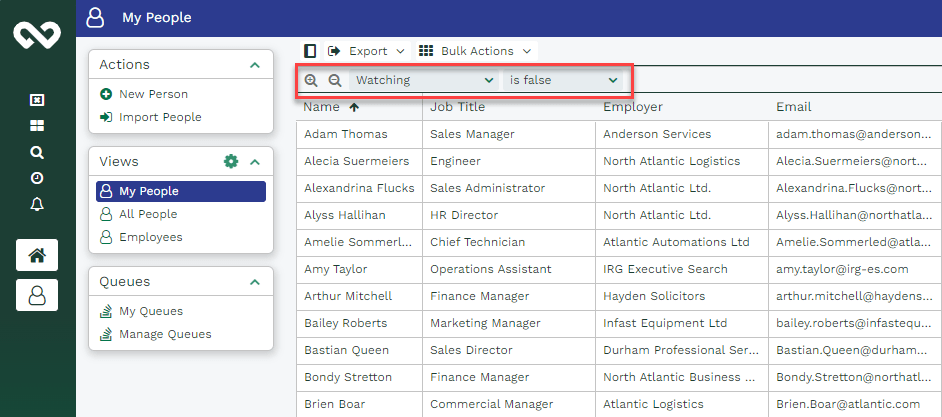
Another option is to add a Mail Sync checkbox field to your People and Organization records. Users can then decide which records should be synchronized by ticking or unticking the checkbox.
You can apply this field as a filter in both the Mail Sync and My People/My Organizations views, helping to keep the number of synchronized records manageable and reduce the risk of timeouts.
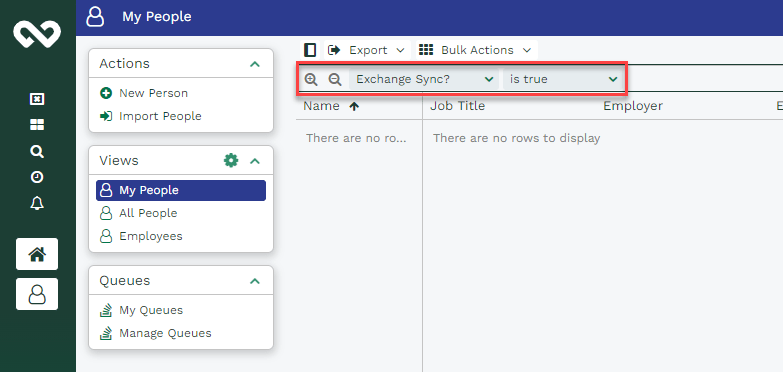
After updating the filters, allow the synchronization to run again. If the same error occurs, you’ll need to further reduce the number of records being synchronized by applying additional filters.
If you’ve already reduced the number of records and the issue persists, ask an authorized Support Contact to contact Workbooks Support for further assistance.