









Included PDF Templates
Workbooks comes with some PDF Templates included for all Transaction Document types. These PDFs can be tailored slightly to suit your needs, using PDF Settings.
Any changes that aren’t covered below will need changes to the underlying template – please raise any queries with Support.
You’ll see both a Portrait and Landscape version of each document – both use the same settings below, but the Landscape version has an additional PDF Setting called ‘Page_Orientation’ to set its orientation.
Header
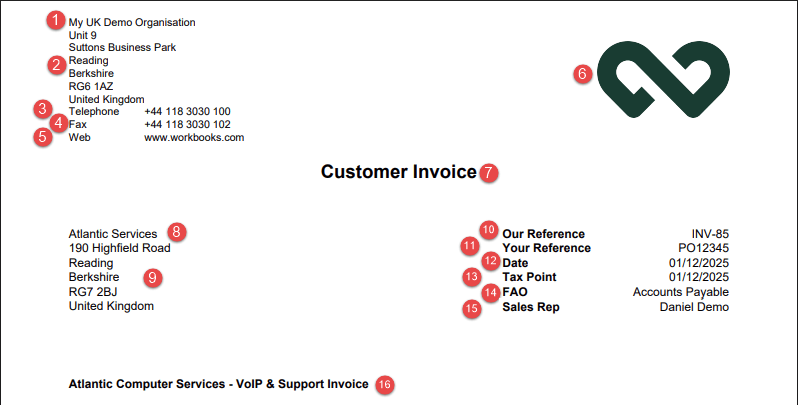
1. The name of your Own Organisation. If you have more than one, this will be the one related to the Transaction Document.
2. The address of the Own Organisation, as pulled from the Organisation record.
3. The label of ‘Telephone’ is controlled by the Label of the ‘Phone_Number’ PDF Setting. If the Value of the PDF Setting is left as @own_phone_number@, then the Phone Number will pull from your Own Organisation record. Change the field on your Own Organisation, or overwrite the Value to fix it to something else.
4. The label of ‘Fax’ is controlled by the Label of the ‘Fax_Number’ PDF Setting. If the Value of the PDF Setting is left as @own_fax_number@, then the Fax Number will pull from your Own Organisation record. Change the field on your Own Organisation, or overwrite the Value to fix it to something else.
5. The label of ‘Web’ is controlled by the Label of the ‘Website’ PDF Setting. If the Value of the PDF Setting is left as @own_website@, then the website will pull from your Own Organisation record. Change the field on your Own Organisation, or overwrite the Value to fix it to something else.
Items 1 to 5 use the font colour specified in the ‘Address_Text_Colour’ Default Color Setting.
6. The logo pulls from the Default Image called ‘header_logo’. The image has a fixed height of 2cm, so you may need adjust your image size if your logo is particularly wide, as it can overlap the address on the left.
7. This will be the name of the Transaction Document, or pulls from the ‘Title’ PDF Setting if set. When setting this PDF Setting, you need to set it as a PDF Template-Specific Setting, so that it only applies to that transaction type.
Also, the colour of the title can be controlled using the ‘Header_Text_Colour’ Default Color Setting.
8. The Customer Name. Displayed in the font colour stored in ‘Main_Text_Colour’ Default Color Setting.
9. The Customer’s Address. Displayed in the font colour stored in ‘Main_Text_Colour’ Default Color Setting.
10. Uses the label ‘Our Reference’, or pulls from the Label of the ‘Document_Number’ PDF Setting. Value is pulled from the Object Reference.
11. Uses the Label from the ‘Reference’ PDF Setting. Value is pulled from the ‘Customer Reference’ field. Only displays if ‘Customer Reference’ field and the ‘Reference’ PDF Setting Label is not blank.
12. Uses the Label from the ‘Date’ PDF Setting. Value is pulled from the Document Date field (i.e. ‘Customer Order Date’ or ‘Customer Invoice Date’ fields).
Displayed using the Date Format specified in the ‘Date_Format’ PDF Setting, which allows for ‘dd/MM/yyyy’, ‘MM/dd/yyyy’ or ‘yyyy-MM-dd’. Only displays if the ‘Date’ PDF Setting Label is not blank.
13. Only displayed on Invoices or Credit Notes, and only if the ‘Tax_Point_Date’ PDF Setting Label is not blank. Uses the Label from the ‘Tax_Point_Date’ PDF Setting. Value is pulled from the ‘Tax point date’ field, displayed in the Date Format specified in the ‘Date_Format’ PDF Setting.
14. Uses the Label from the ‘FAO’ PDF Setting. Value is pulled from the ‘FAO’ field. Only displays if ‘FAO’ field and the FAO’ PDF Setting Label is not blank.
15. Uses the Label from the ‘Assigned_To’ PDF Setting. Value is pulled from the ‘Assigned to’ field. Only displays if ‘Assigned_To’ PDF Setting Label is not blank.
16. The ‘Name’ from the Transaction Document.
The Labels in Items 10 to 16 use the font colour specified in the ‘Header_Text_Colour’ Default Color Setting. The Values use the ‘Main_Text_Colour’ Default Color Setting.
Line Item Table
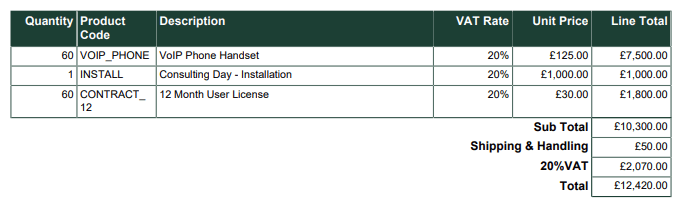
There is a slight variation in the columns that are shown depending on the Transaction Document type:
Quotations and Orders:
- Quantity
- Product Code
- Description
- Unit Price
- Discount
- Line Total
Invoices and Credit Notes
- Quantity
- Product Code
- Description
- VAT Rate
- Unit Price
- Discount
- Line Total
Contracts
- Quantity
- Product Code
- Description
- Start Date
- End Date
- Unit Price
- Line Total
Supplier Orders:
- Quantity
- Product Code
- Description
- Unit Price
- Line Total
You can control the Labels used for each of the column headers as follows:
Quantity – pulls from the ‘Quantity’ PDF Setting Label, defaults to ‘Quantity’ if Setting is left blank.
Product Code – pulls from the ‘Product_Code’ PDF Setting Label, defaults to ‘Product Code’ if Setting is left blank.
Description – pulls from the ‘Description’ PDF Setting Label, defaults to ‘Description’ if Setting is left blank.
VAT Rate – fixed
Start Date – pulls from the ‘Start_Date’ PDF Setting Label, defaults to ‘Start Date’ if Setting is left blank.
End Date – pulls from the ‘End_Date’ PDF Setting Label, defaults to ‘End Date’ if Setting is left blank.
Unit Price – pulls from the ‘Unit_Price’ PDF Setting Label, defaults to ‘Unit Price’ if Setting is left blank.
Discount – only shows this column if a discount is applied to at least one line item. Pulls from the ‘Discount’ PDF Setting Label, defaults to ‘Discount’ if Setting is left blank. The ‘Display_Discount_As’ PDF Setting can be used to control whether to output the Discount as a percentage or amount.
Line Total – pulls from the ‘Line_Total’ PDF Setting Label, defaults to ‘Line Total’ if Setting is left blank.
You can control the colours of the Table too:
- The borders are controlled by the ‘Table_Border_Colour’ Default Color Setting.
- The header background colour is pulled from the ‘Table_Header_Colour’.
- The header text colour is from ‘Table_Header_Text_Colour’.
- The table body text is from ‘Main_Text_Colour’.
The Line Items will not include any lines where the Product Code or Description contains ‘SHIPPING’, which is instead added as an extra row in the table totals.
Totals
- Sub Total – Only shown if the Own Organisation’s VAT Number is populated, if the ‘Sub_Total’ PDF Setting Label is not blank, and not shown on Credit Notes. The Label pulls from the ‘Sub_Total’ PDF Setting, and the value is the sum of the Net of all Line Items excluding those that contain ‘SHIPPING’.
- Shipping & Handling – Only shown if there is at least one Line Item where Product Code or Description contain ‘SHIPPING’. The Label pulls from the ‘Shippingl’ PDF Setting, and the value is the sum of the Net of all Line Items that contain ‘SHIPPING’.
- VAT – The Label pulls from the ‘VAT’ PDF Setting, concatenated with the Tax Rate Percent. On an Invoice or Credit Note, if more than one Tax Code is applied across the line items, a separate row will be shown per Tax Rate Percent applied, with the label in the format of ‘X% VAT of Y”, where Y is the Total Net of the Lines that Tax Rate Percent applies to. Otherwise, the VAT row only shows when the ‘VAT’ PDF Setting Label is not blank, and when the Own Organisation VAT Number is not blank.
- Total – The Label pulls from the ‘Total’ PDF Setting Label.
Additional Details
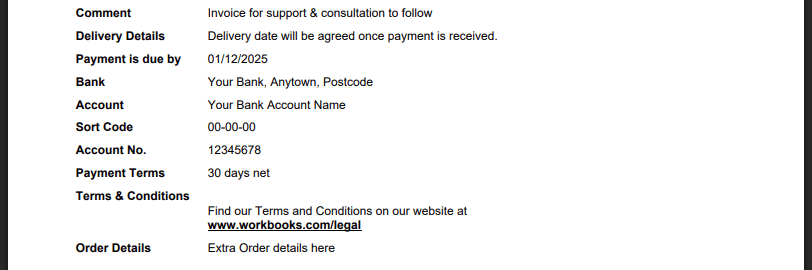
- Comment – The Label pulls from the ‘Comment’ PDF Sewtting and the value from the ‘Comments’ field. Shows if the ‘Comment’ PDF Setting Label is not blank and the ‘Comments’ field is not blank.
- Delivery Details – The Label and Value pull from the ‘Delivery_Details’ PDF Setting. Only shows if both the Label and Value of the PDF Setting are not blank.
- Payment is due by – The Label is pulled from the ‘Payment_Due_Date’ PDF Setting, and the value from the ‘Payment Due Date’ field, shown in the date format specified by the ‘Date_Format’ PDF Setting. Only shows on Invoices, if the ‘Payment_Due_Date’ PDF Setting Label is not blank.
- Bank – The Label and Value pull from the ‘Bank_Name_Address’ PDF Setting. Only shows on Invoices, if the ‘Bank_Name_Address’ Label and Value are not blank.
- Account – The Label and Value pull from the ‘Bank_Account_Name’ PDF Setting. Only shows on Invoices, if the ‘Bank_Account_Name’ Label and Value are not blank.
- Sort Code – The Label and Value pull from the ‘Bank_Account_Sort_Code’ PDF Setting. Only shows on Invoices, if the ‘Bank_Account_Sort_Code’ Label and Value are not blank.
- Account Number – The Label and Value pull from the ‘Bank_Account_Number’ PDF Setting. Only shows on Invoices, if the ‘Bank_Account_Number’ Label and Value are not blank.
- IBAN – The Label and Value pull from the ‘Bank_Account_IBAN’ PDF Setting. Only shows on Invoices, if the ‘Bank_Account_IBAN’ Label and Value are not blank.
- Payment Terms – The Label and Value pull from the ‘Payment_Terms’ PDF Setting. Only shows if the ‘Payment_Terms’ Label and Value are not blank.
- Terms & Conditions – The Label and Value pull from the ‘Terms_Conditions’ PDF Setting. Only shows if the ‘Terms_Conditions’ Label and Value are not blank. Whilst this can handle multiline text and formatting, we recommend that you store your terms and conditions on your website and use this to direct your customers there.
- Order Details – The Label and Value pull from the ‘Order_Details’ PDF Setting. Only shows if the ‘Order_Details’ Label and Value are not blank.
Signature Block
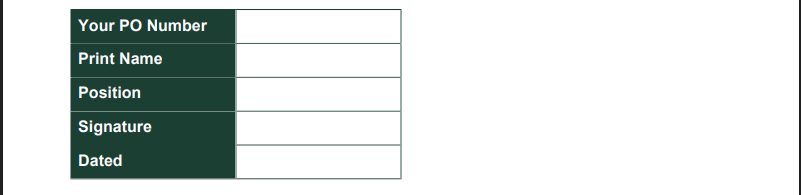
This is shown on Quotations, Orders and Contracts, if at least one of the following PDF Settings is not blank:
- Your PO Number – Label pulls from the ‘Your_PO’ PDF Setting.
- Print Name – Label pulls from the ‘Print_Name’ PDF Setting.
- Position – Label pulls from the ‘Position’ PDF Setting.
- Signature – Label pulls from the ‘Signature’ PDF Setting.
- Dated – Label pulls from the ‘Date_Signature’ PDF Setting.
You can control the colours of the Table too:
- The borders are controlled by the ‘Table_Border_Colour’ Default Color Setting.
- The label background colour is pulled from the ‘Table_Header_Colour’.
- The label text colour is from ‘Table_Header_Text_Colour’.
Footer

1. The name of your Own Organisation. If you have more than one, this will be the one related to the Transaction Document.
2. The Label is pulled from the ‘Registered_Office’ PDF Setting, or defaults to ‘Registered Office’ if the Setting is blank. If the Value of the PDF Setting is left as @own_registered_office@, then the address will pull from your Own Organisation record. Change the field on your Own Organisation, or overwrite the Value to fix it to something else. This row only shows if the ‘Registered_Office:’ PDF Setting Value is not blank.
3. The Label is pulled from the ‘Company_Number’ PDF Setting, or defaults to ‘Company Number’ if the Setting is blank. If the Value of the PDF Setting is left as @own_company_number@, then the address will pull from your Own Organisation record. Change the field on your Own Organisation, or overwrite the Value to fix it to something else. This row only shows if the ‘Company_Number:’ PDF Setting Value is not blank.
4. The Label is pulled from the ‘VAT_Number’ PDF Setting, or defaults to ‘VAT Number:’ if the Setting is blank. If the Value of the PDF Setting is left as @own_vat_number@, then the address will pull from your Own Organisation record. Change the field on your Own Organisation, or overwrite the Value to fix it to something else. This row only shows if the ‘VAT_Number’ PDF Setting Value is not blank.
5. The page numbers will be output in the form ‘Page X of Y’, where ‘Page’ is from the ‘Page_Number’ PDF Setting Label, and ‘of’ is from the ‘Page_Count’ PDF Setting Label. If the ‘Page_Count’ PDF Setting Label is blank, the page number just outputs in the form of ‘Page X’, and if the ‘Page_Number’ PDF Setting Label is blank, no page numbers will be shown.