How to create a PDF copy of your document to be printing or set it up to automatically be attached to an email.


As part of the Workbooks configuration, each of the Own Organisations should be set up with a home currency and a list of permitted foreign currencies.
Definitions:
Remember to review your Exchange Rates periodically.
When creating Transaction Documents, such as a Quotation or an Invoice, the Own Organisation, (which will determine the home currency for the document) and the document currency itself, must be set. If the logged-in User is associated with more than one Own Organisation then they will be presented with a choice. The document currencies will be restricted to the allowed currencies for the Own Organisation selected.
If an Invoice, for example, is POSTED with an Exchange Rate which is different to a subsequent receipt or payment to settle the Invoice, then the difference between the two values, assuming the payment is in full, can be considered as an exchange loss or gain.
When an Invoice is POSTED, the Document Currency can still be changed via a Button at the top of the Record displaying the current currency. Clicking on the button will reveal a drop-down menu of the available currencies. A currency must have an Exchange Rate configured to appear on this list:
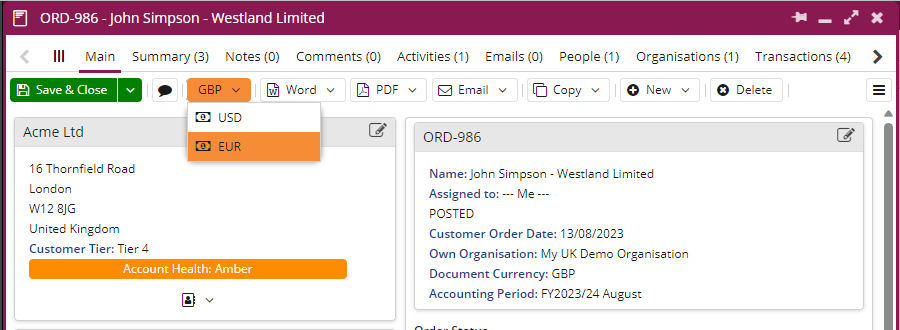
When a new Currency is selected, there is an option to either keep the numerical values the same, changing the currency, or to convert these values using the configured Exchange Rate. These changes will applied to the Line Items of the Transaction Document:
