









Sharing Policies & Mandatory Permissions
Detailed guidance covered how to use Mandatory Permissions and Sharing Policies to control what a User can do/see in Workbooks.
The Permissions applied to objects (record types) are a product of the Mandatory Permissions applied to the object combined with the Sharing Policies for that object. You can access these settings by clicking Start > Configuration> Permissions.
Note: You will only be able to access this area of the configuration menu by either having a Pro Licence or have purchased the Advanced Security Module.
Mandatory Permissions
The Mandatory Permissions for an object are the base-level permissions which are always in place regardless of any changes that a User tries to make. Users are not able to change the Mandatory Permissions; they must always apply. The Mandatory Permissions can be changed by a System Administrator but this is not generally recommended unless there is a strong business reason for changing them.
By default your Workbooks account is configured so that the majority of objects have a mandatory Ruleset called Minimum Access.
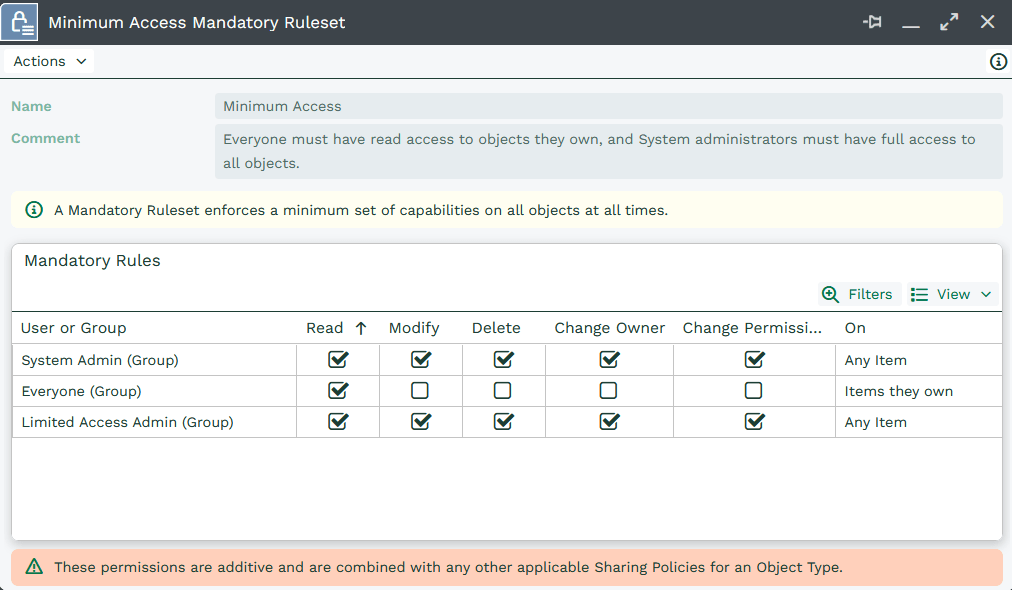
This means that as a bare minimum all Users have read access to objects they’ve created and Users in the System Administration group have full access to all objects.
Each object type has one set of Mandatory Permissions.
NOTE: A Ruleset is a set of permissions grouped together.
System Administrators are able to change the Mandatory Permissions by going to Start > Configuration> Permissions and selecting the Mandatory Permissions tab.
Within the Mandatory Rulesets you can control whether Sharing Policies are applied when the record is created or when ownership of the record changes. To do this, open the Mandatory Rulesets Landing Page and choose the type of record from the list on the right. You’re presented with a dropdown picklist that allows you to specify when Sharing Polices are applied.
NOTE: A record is owned by the user to whom the record is assigned. If you assign the record to a Queue, the permissions can also be recalculated depending on the Queue configuration. You will need to configure your Permissions so that this situation is taken into account. See here for configuring Queues.
Tip
You can control whether Sharing Policies are applied when a record is created or when ownership of a record changes.
This is available by navigating to the Mandatory Rulesets Landing Page and opening the row for the record type you want to change.
Sharing Policies
Sharing Policies combine with Mandatory Permissions to determine the overall permissions of an object when it’s first created. By default, Workbooks is supplied with one Sharing Policy for each object type, but a System Administrator can create more if required.
Sharing Policies can be configured so that they are applied either when the record is created or when the ownership of the record changes (i.e., when the record is reassigned from one user to another).
NOTE: Assigning a record to a queue does not change the ownership of the record.
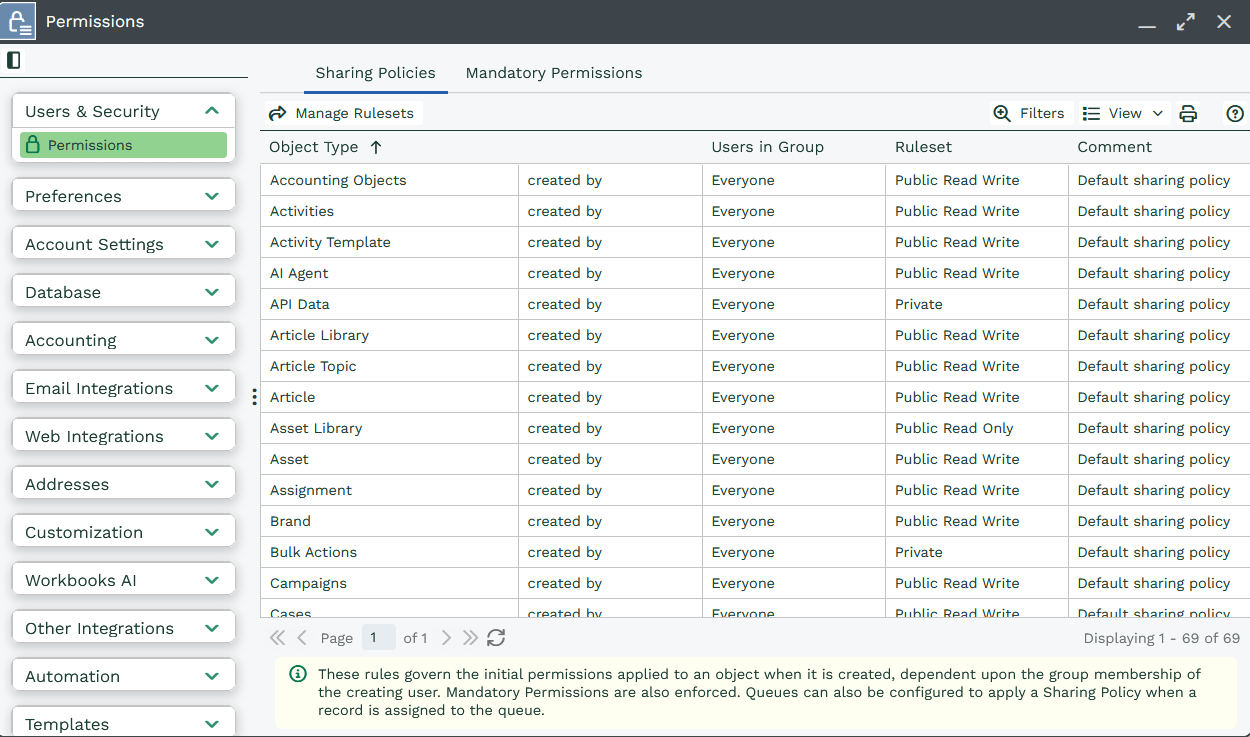
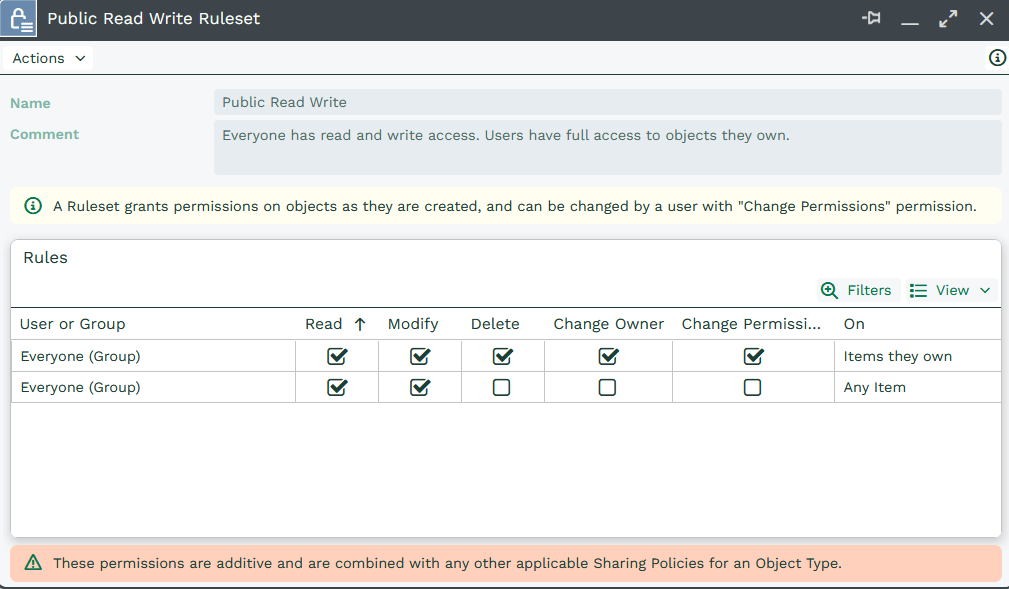
Unless you change the Sharing Policies (which you can only do if you have the Advanced Security extension licence), the majority of objects are configured with a Public Read Write Ruleset. The screenshot below shows you what this means. (Click to enlarge.) As you can see, if a user owns the record they can read, modify, delete, change owner and change permission on that record. If they don’t own the record they can still read and modify the details.
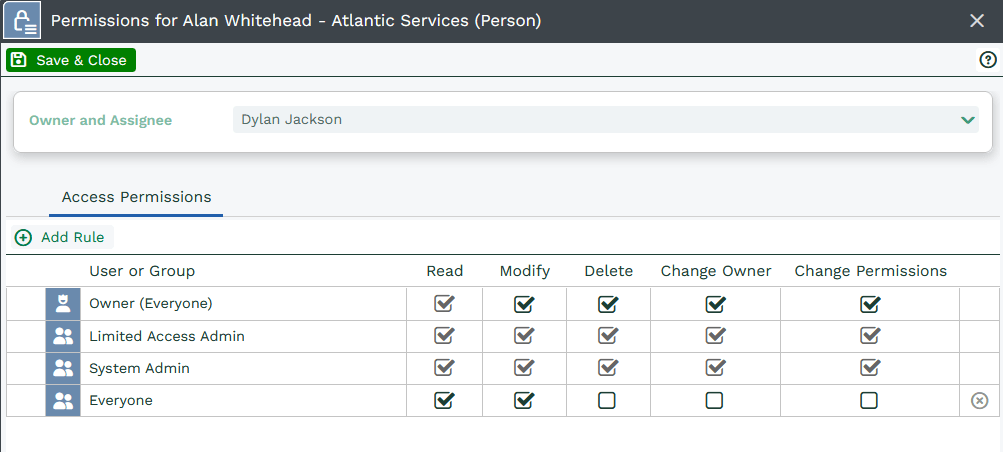
Remember, the Sharing Policy works in conjunction with the Mandatory Permissions so if you haven’t changed the out-of-the-box settings for Mandatory Permissions or Sharing Policies, the permissions for the majority of records will look like this:
Whilst the majority of records are supplied with a Public Read Write Ruleset, some are supplied with a Private Ruleset. When this is combined with the standard Mandatory Permissions it means that users can read, modify, delete, change owner and change permissions on records they own but they cannot even read records that they don’t own.
Users in the System Administrator group will have read, modify, delete, change owner and change permissions regardless of who owns the record. If a record has a Private Ruleset, a user can use the padlock on an individual record to share the record with other users.
Records that are shipped with a Private Ruleset are: API Data, Accounting Objects, Bulk Actions, Dashboards, Email Credentials, Form Layouts, Import Jobs, Processes, Record Templates, Scripts, Templates and Views.
The permissions an object is given when it’s first created depend on which User is creating the object and which Sharing Policy applies for that User.
It is possible to create Sharing Policies for specific users and groups. However it is important to understand that when a new object is created the permissions it is given are based on ALL the policies that the user is matched against.
NOTE: Changing the Sharing Policies only affect records created after the changes have been made. The permissions of all existing records are not changed.
To update existing records with the new policy, navigate to the records landing page and select the bulk action “Recalculate Permissions”.
NOTE: Changing the Mandatory Permissions will affect all records in the system. However it is possible that changing the Mandatory Permission on an object will not change the Access Permissions of a specific record, if the existing permissions take precedence.