









Third Party Relationships
How to create Relationships between People, Organisations or People and Organisations.
Third party relationships in Workbooks are those which are between People and/or Organisations in your database rather than relationships that are directly with your Own Organisation.
Creating Relationships between third-parties
Party Relationships are created via the People or Organisation tabs on a Party record. These relationships are constrained by the type of the Party record and the tab from which you are creating the relationship, which identifies the type of the target record. Only relationships valid between the source and target record types are shown.
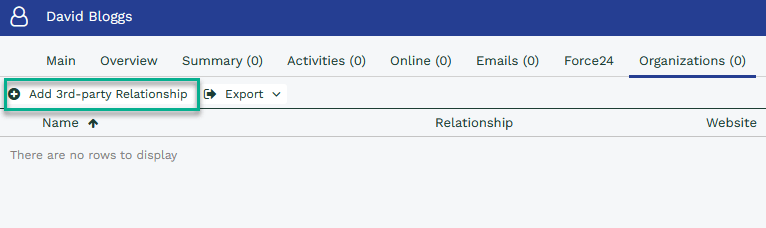
Open a Person record, and then select the Organisation tab along the top of a record. From here, you will see a button called “Add 3rd Party Relationship”:
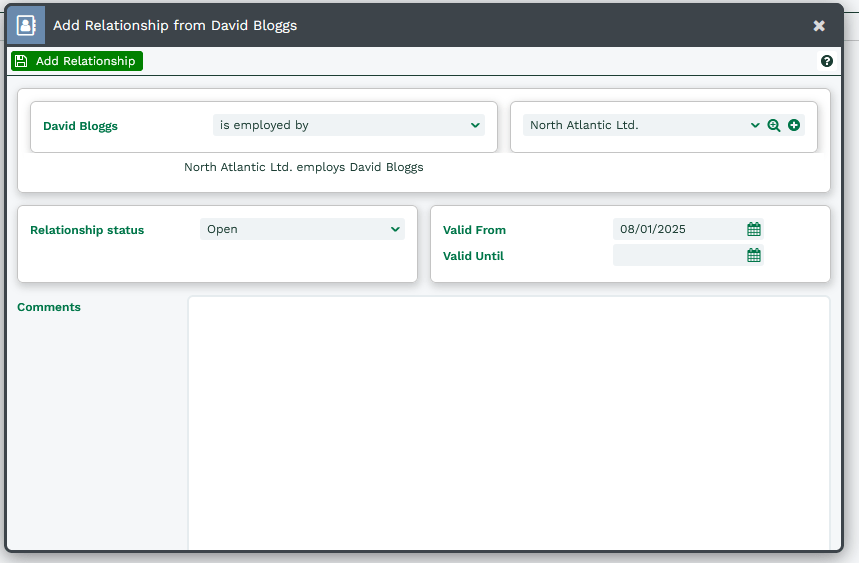
The dialogue box that appears on the screen allows you specify details about the Relationship. By default, you can specify the following information:
- The first picklist will show all of the Relationships from the Party Relationships Customisation screen that have been marked as a “3rd Party” and are valid between .
- The second picklist will show a list of People/Organisations that you can relate your record to. The list is dependent on how you have configured the relationship and is controlled by the “Party Type” picklist on the Relationship Configuration screen.
- Relationship status – Defines whether the relationship is Open, Closed, Awaiting Approval or Suspended.
- Valid From – Date field to hold when this relationship started or is due to start.
- Valid Until – Date field to hold when this relationship finished or is due to finish.
- Comments – A simple Rich Text Field to collect any relevant notes.
You can create custom fields to capture additional information about the Relationship via Start > Configuration > Customisation > Record Types > Party Relationships > Fields.
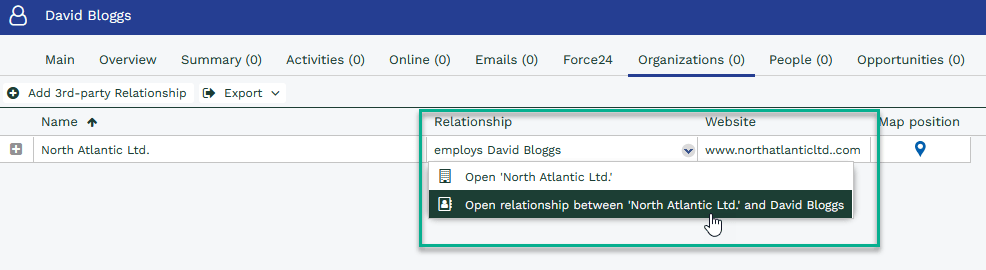
Once you have added the relationship, you will be returned to the Organisations tab where you can see an overview of that person’s related Organisations. To open the Relationship, right click in the ‘Relationship’ column to open the context menu.
- Summary – contains an overview of what has happened with the relationship over time including audit so you can track changes.
- Notes – Additional information about the relationship that you may not necessarily want to show on the front of the record.
- Activities – Allows you to create Activity records where reminders can be set to follow up on Relationships and ensure that your data is kept up-to-date.
- Emails – Communications between the related people are stored here.
- Related Items – You can relate other record types here that might be useful for ease of access.
The behaviour described in this section also applies to creating Relationships from the Organisations tab as well.
Deleting Third Party Relationships
You need to open the Relationship to delete it. As above, open the Relationship, then click “Delete“.
Tip
Sometimes you may see that a Person appears twice on the People tab of an Organisation, for example; this does not necessarily mean that there is a duplicate Person, but instead that there is a duplicate relationship. Open both relationships to compare them before deleting one.